Configuration
warning
For each step to work, complete all the previous ones.
In settings.py:
1. Point to the logs directories/files:
import os

LOGS_DIRS = [
    {
        "path": os.path.join(BASE_DIR, "logs"), # Path to the directory
    },
    {
        "path": "some/path/traceback.txt"), # Path to the file
    },
    # More can be added
]
Result:

- File content is displayed without parsing
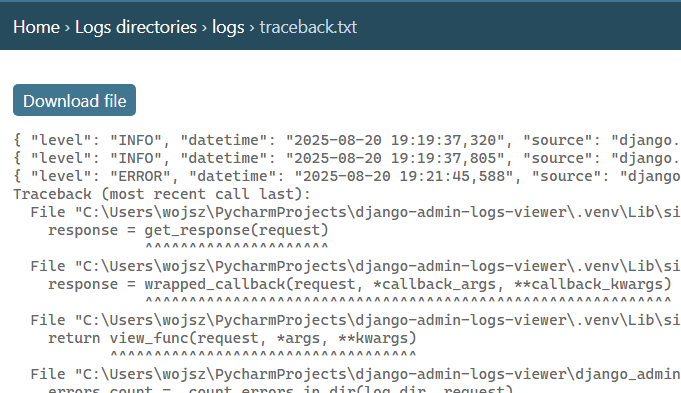
...but that's boring. Isn't it?
2. Add reusable logs parsers:
from django_admin_logs_viewer import LOGS_PREDEFINED_REGEXES

LOGS_PARSERS = {
    "custom-parser": {
        "pattern": r'^\[(\w+)\]\s+(\S+)\s+(.*)$', # Required. (Space-separated simple log: [LEVEL] 2025-08-22T12:34:56 Message)
        "column_names": ["Level", "Time", "Path", "File & Line No ", "Message"], # Optional
        "column_types": ["LEVEL", "TIME", "OTHER", "OTHER", "OTHER"], # Optional
        "datetime_format": "%Y-%m-%d %H:%M:%S,%f", # Optional
    },
    "json-parser": {
        "pattern": LOGS_PREDEFINED_REGEXES.json, # Required. Using predefined regex
        "column_names": ["Level", "Time", "Path", "File & Line No ", "Message"], # Optional
        "column_types": ["LEVEL", "TIME", "OTHER", "OTHER", "OTHER"], # Optional
        "datetime_format": "%Y-%m-%d %H:%M:%S,%f", # Optional
    }
}
note
column_namesare optional.column_typesare optional. They allow for level and time filtering and colors. Keywords are"LEVEL","TIME".datetime_formatis optional. Default: %Y-%m-%d %H:%M:%S,%f (E.g. 2025-08-20 19:21:45,588).
You can use one of the predefined regexes:
# JSON style log: {"level":"INFO","time":"2025-08-22T12:34:56","path":"/app","file":"app.py","message":"Something happened"}
LOGS_PREDEFINED_REGEXES.json

# Comma-separated: Level,Time,Path,File,Message
LOGS_PREDEFINED_REGEXES.comma_separated

# Space-separated simple log: [LEVEL] 2025-08-22T12:34:56 Message
LOGS_PREDEFINED_REGEXES.simple_space

# Syslog format: Aug 22 12:34:56 hostname program[pid]: message
LOGS_PREDEFINED_REGEXES.syslog
3. Add parsers to your directories/files
LOGS_DIRS = [
    {
        "path": os.path.join(BASE_DIR, "logs"),
        "parser": "json-parser",
    },
    {
        "path": os.path.join(BASE_DIR, "logfile_commands.log"),
        "parser": "custom-parser",
    },
]
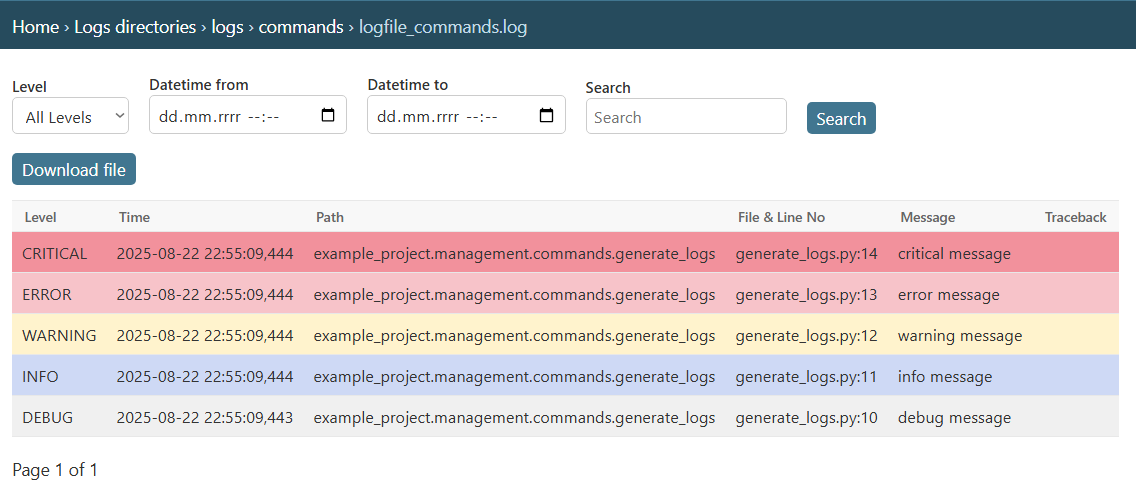
Result:
- separate rows, traceback, filtering
- colors!
You can limit rows per page using:
LOGS_ROWS_PER_PAGE = 50 # Default: 100
4. If you want to show errors since last login:
Both of these are required:
LOGS_SHOW_ERRORS_SINCE_LAST_LOG_IN = True # Default: False. Assumes logs are ordered from older to newer. Can affect performance for large files.
LOGS_TIMEZONE = "Europe/Warsaw"
Result:
